
Ansapoint is a Windows software tool to can help you work out how many agents you need at your call center in order to answer your incoming calls according to service targets that you specify. It will also estimate the number of trunks that should be connected to your call center to handle the peak incoming traffic.
“This software package is a wonderful tool and a must for any call center or help desk.”
Owen Reese, Fleet Mortgage Group
Its unique graphical interface, charting tools and printed reports allow you to design call center workforce requirements quickly and easily. Ansapoint works on all versions of Windows, both 32 and 64 bit.
Using Ansapoint for call center staffing analysis
Ansapoint is similar in layout to Windows Explorer, making it familiar and easy to use for everyone. You can navigate the call center staffing data and parameters using the left hand pane of the window, which is organised into projects.
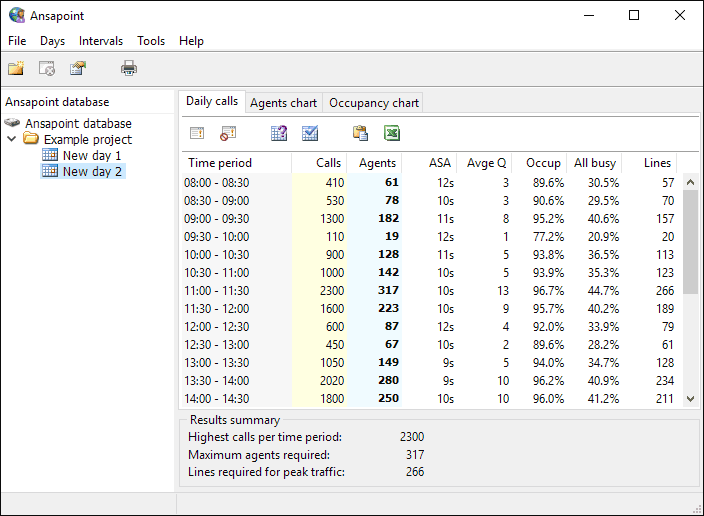
You enter call data on the right side of the application, making entries (rows) for each time period; either 15, 30 or 60 minutes. As soon as you enter the number of calls in the yellow column, Ansapoint calculates the following results:
- The number of agents you require
- The Average Speed to Answer (ASA)
- The average length of the queue
- The percentage of time that the agents are occupied
- The percentage of time that all your agents are busy
- The number of lines required into the telephone system serving your call center
Alternatively, you can enter the number of available agents in the Agents column, in which case Ansapoint will estimate how many calls they can handle in each time interval. You can also import values from Microsoft Excel. Ansapoint supports inbound call volumes of up to 100,000 per hour. For each project, you can specify the service level targets in terms of the percentage of calls answered within a queuing time that you specify – for example: 80% of calls to be answered within 20 seconds.
Ansapoint supports these features:
- Definable service level targets
- 15, 30 or 60 minute intervals
- Call volumes can be imported
- Definable average call durations of up to 30 minutes
- Definable average wrap-up times of up to 30 minutes
- Agent availability factor to take staff breaks into account
- Definable trunk blocking targets (e.g. 1%)
- Support for 100,000 inbound calls per hour
- Variable start times for call center operations
- Clear printed reports
- Bar and line charts
Advanced call center staffing features
Despite its ease of use, Ansapoint offers advanced reporting features. You can print a report for each day, detailing the call volumes and analytical results for each hour (or half hour) and summarising the call properties and service level targets of the projects. Comprehensive charting lays out the call center staffing requirements for each hour of the day being analysed and plots agent occupancy against time. Charts can be printed, or pasted into other applications such as Microsoft Word.

Ansapoint keeps all your information in a local database so you don’t need to save anything; all changes are stored as they are entered or calculated.
Documentation
Ansapoint is installed with an illustrated user guide and help system. You’re welcome to contact us if you have any questions about the software, but please check the Ansapoint FAQ first.
Purchase and download

“Thanks for all you assistance and very quick response… I will certainly recommend you to our clients.”
Jeremy Hamill-Keays, Terraplay.
Ansapoint can be working on your PC within five minutes for a once-only licence fee that entitles you to free upgrades for life. Please choose the licence type you need:
| Single user Installation on a single PC | $149 |
| Site Licence Unlimited installations in one building of your company | $1495 |
| Global Licence Installation on any of your company’s PCs worldwide | $4495 |